A. The Computational Revolution: Why GPU Servers Are Redefining Industries
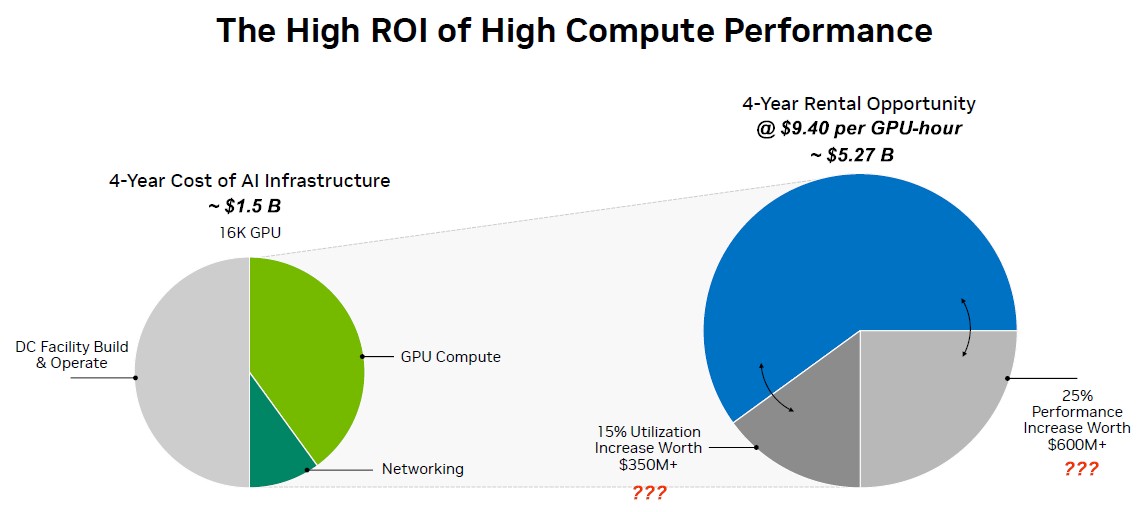
In the era of artificial intelligence, complex scientific simulation, and high-fidelity visual rendering, the demand for unprecedented computational power has skyrocketed. At the heart of this digital transformation lies the Graphics Processing Unit (GPU), a specialized processor originally designed for accelerating computer graphics but now serving as the workhorse for parallel processing tasks. However, the prohibitive cost of purchasing high-end GPU hardware outright, coupled with rapid technological obsolescence, has made GPU server rental the dominant and most strategic model for accessing this power. Renting a GPU server provides on-demand, scalable access to cutting-edge hardware without massive capital expenditure. This in-depth guide will dissect the multifaceted world of GPU server rental costs, providing a clear framework for understanding pricing models, the factors that influence your bill, and strategic approaches to optimize your cloud GPU spending for projects ranging from AI model training to 3D animation.
The shift from CPU-centric to GPU-accelerated computing represents a fundamental change in processing philosophy. While CPUs are designed for sequential, complex tasks, GPUs contain thousands of smaller, efficient cores designed to handle multiple tasks simultaneously. This parallel architecture makes them exceptionally adept at the matrix and vector operations that underpin deep learning, the ray-tracing calculations for rendering, and the computational workloads for scientific research. Understanding the cost of accessing these resources is the first step in leveraging their transformative potential for your business or research.
B. Deconstructing GPU Server Architecture: More Than Just a Graphics Card
A rentable GPU server is a sophisticated piece of infrastructure where the GPU is the star component, but it is supported by a carefully balanced ecosystem of other hardware. Understanding this architecture is key to understanding the cost structure.
A. The GPU Accelerator: The Core Engine
The choice of GPU model is the single most significant factor determining the rental price. The market is dominated by NVIDIA, with AMD and other players gaining traction.
-
NVIDIA Tesla T4: An efficient, low-power card ideal for inference, light training, and virtual desktop infrastructure (VDI). It offers a good balance of performance and cost for entry-level AI and mainstream applications.
-
NVIDIA RTX 3090/4090: While consumer-grade, these are powerful cards often found in “prosumer” and smaller cloud providers. They offer excellent performance for deep learning and rendering at a more accessible price point than data center cards but lack the vRAM and reliability features of their enterprise counterparts.
-
NVIDIA A100 / AMD Instinct MI210: The former is the previous-generation data center workhorse, featuring 40GB or 80GB of HBM2e memory and transformative speed for large model training and HPC. The latter is AMD’s competitive offering in this space.
-
NVIDIA H100 / AMD Instinct MI300X: The current-generation flagships, designed for the largest-scale AI workloads. They feature dedicated Transformer Engine cores (H100) and massive memory bandwidth, commanding a premium price.
B. The Supporting Cast: CPU, RAM, and Storage
A powerful GPU cannot function in a vacuum. It requires a complementary system to feed it data.
-
CPU (Central Processing Unit): The server requires a capable CPU to manage data preprocessing, I/O operations, and task scheduling. An underpowered CPU will become a bottleneck, leaving the GPU underutilized.
-
RAM (System Memory): Adequate system RAM is crucial. A general rule is to have enough RAM to hold the entire dataset being processed, plus the operating system and application overhead. Insufficient RAM will lead to constant disk swapping, crippling performance.
-
Storage Drive I/O: The speed of your storage directly impacts how quickly data can be loaded into the GPU’s memory. High-performance NVMe SSDs are essential for training workflows with large datasets to avoid the GPU sitting idle waiting for data.
C. Network Connectivity
For multi-node training (training a model across multiple GPU servers), high-speed, low-latency interconnects like NVIDIA NVLink (for direct GPU-to-GPU communication) and InfiniBand networking are critical. These technologies significantly increase costs but are necessary for cutting-edge research and large-scale commercial AI.
C. The Primary Pricing Models for GPU Server Rentals
Cloud providers offer several billing models, each with its own strategic advantage depending on the nature and duration of your workload.
A. On-Demand Instances: Maximum Flexibility
This is the default pay-as-you-go model. You pay a fixed, typically hourly rate for the server for as long as it is running.
-
Pros: Ultimate flexibility; no long-term commitment; perfect for short-term projects, experimentation, and variable workloads.
-
Cons: The most expensive option on a per-hour basis. Costs can escalate quickly if instances are left running unintentionally.
-
Example Cost: An NVIDIA A100 instance may cost $3.00 – $4.50 per hour.
B. Spot/Preemptible Instances: Massive Cost Savings
This model allows you to bid on unused cloud capacity, offering discounts of up to 60-90% compared to On-Demand prices.
-
Pros: Extremely low cost; ideal for fault-tolerant, flexible workloads like hyperparameter tuning, batch processing, and some rendering jobs.
-
Cons: The provider can reclaim the instance with little warning (e.g., 30 seconds to 2 minutes), interrupting your job. Not suitable for mission-critical or time-sensitive production workloads.
-
Example Cost: The same A100 instance might be available on the spot market for $0.90 – $1.50 per hour.
C. Reserved Instances & Savings Plans: Long-Term Commitments
By committing to a one-year or three-year term, you receive a substantial discount compared to On-Demand rates.
-
Pros: Significant cost savings (up to 60-70%) for predictable, steady-state workloads. Provides capacity reservation, ensuring availability.
-
Cons: Requires a long-term financial commitment and a clear forecast of your usage. Lack of flexibility if project needs change.
-
Example Cost: A one-year reserved commitment could bring the effective hourly rate for an A100 down to $1.50 – $2.00 per hour.
D. Monthly Rental from Specialized Providers
Dedicated bare-metal GPU hosting providers often offer simple monthly flat-rate pricing. This is common for rendering farms and specialized AI startups.
-
Pros: Cost predictability; full, dedicated access to the hardware; often includes more personalized support.
-
Cons: Less granular than hourly billing; typically requires a monthly minimum commitment.
-
Example Cost: A server with 4x RTX 4090 GPUs might rent for a flat $1,200 – $1,800 per month.

D. Key Factors Directly Influencing Your Final Rental Bill
Beyond the base pricing model, several other factors can have a substantial impact on your total cost of ownership (TCO).
A. GPU Model and Quantity
As discussed, an H100 server will be exponentially more expensive than a T4 server. Furthermore, a server with 8x A100 GPUs will cost significantly more than a single-A100 instance, though often with volume discounts.
B. Cloud Provider and Region Selection
Prices for identical GPU instances can vary significantly between providers (AWS, Google Cloud, Azure, CoreWeave, Lambda Labs, etc.) and even between different data center regions operated by the same provider. Regions with lower energy costs or less demand may offer lower prices.
C. Level of Server Management
-
Unmanaged IaaS (Infrastructure-as-a-Service): You are responsible for the entire software stack, including the OS, drivers, and applications. This is the cheapest option but requires high expertise.
-
Managed Services & SaaS (Software-as-a-Service): Providers like Paperspace Gradient or SageMaker offer platforms that abstract away the underlying infrastructure. You pay a premium for the convenience, managed environment, and pre-configured tooling.
D. Egress and Data Transfer Fees
This is a critical and often overlooked cost. Most cloud providers charge fees to transfer data out of their network (egress). If you are processing terabytes of data and need to download the results frequently, these fees can add up to a substantial amount. Ingress (uploading data) is usually free.
E. Storage and Backup Costs
The persistent storage volumes (block storage) attached to your GPU instance incur a separate monthly cost based on the amount of GB provisioned and the performance tier (e.g., standard HDD, SSD, or premium NVMe). Additionally, storing system snapshots and backups adds to the overall bill.
E. Strategic Cost Optimization for GPU Workloads
Managing GPU cloud costs is an active discipline. Here are proven strategies to keep your budget under control.
A. Right-Sizing Your Instance
Do not overprovision. Start with a smaller instance for development and testing. Use cloud monitoring tools to track your GPU utilization (%). If it’s consistently low, you may be using an overpowered instance for the task.
B. Leveraging Spot Instances for Non-Critical Work
Architect your workloads to be fault-tolerant. Use spot instances for training jobs that can be checkpointed and resumed. This can reduce your compute costs by over 60% for appropriate workloads.
C. Implementing Robust Auto-Shutdown Policies
A running GPU instance, even if idle, incurs full cost. Implement automated scripts or use cloud functions to automatically shut down instances after a period of inactivity or when a training job is complete. This is one of the simplest ways to prevent bill shock.
D. Efficient Data and Pipeline Management
-
Data Preparation: Preprocess and clean your data before uploading to the cloud to minimize the storage and compute needed on expensive GPU instances.
-
Use Efficient Data Formats: Store data in efficient formats like TFRecords or Parquet to speed up loading and reduce I/O wait times, making GPU utilization more efficient.
-
Optimize Your Code: Profiling and optimizing your machine learning code can drastically reduce the total training time, thereby reducing rental costs. This includes using mixed-precision training and efficient data loaders.
F. Real-World Use Cases and Cost Projections
To ground the theory in reality, let’s examine common scenarios.
A. Small-Scale AI Model Training & Fine-Tuning
-
Typical Setup: 1x NVIDIA A100 (40GB) or 1x RTX 4090.
-
Workload: Fine-tuning a medium-sized language model or training a custom computer vision model.
-
Estimated Cost: $500 – $2,000 for a project lasting several days to a few weeks (using On-Demand instances).
B. Large-Scale Deep Learning Research
-
Typical Setup: A cluster of 8x NVIDIA H100 nodes with InfiniBand.
-
Workload: Pre-training a large foundational model from scratch.
-
Estimated Cost: $50,000 – $500,000+, depending on the model size and training duration. This scale almost always requires reserved instances or dedicated contracts.
C. 3D Animation and VFX Rendering
-
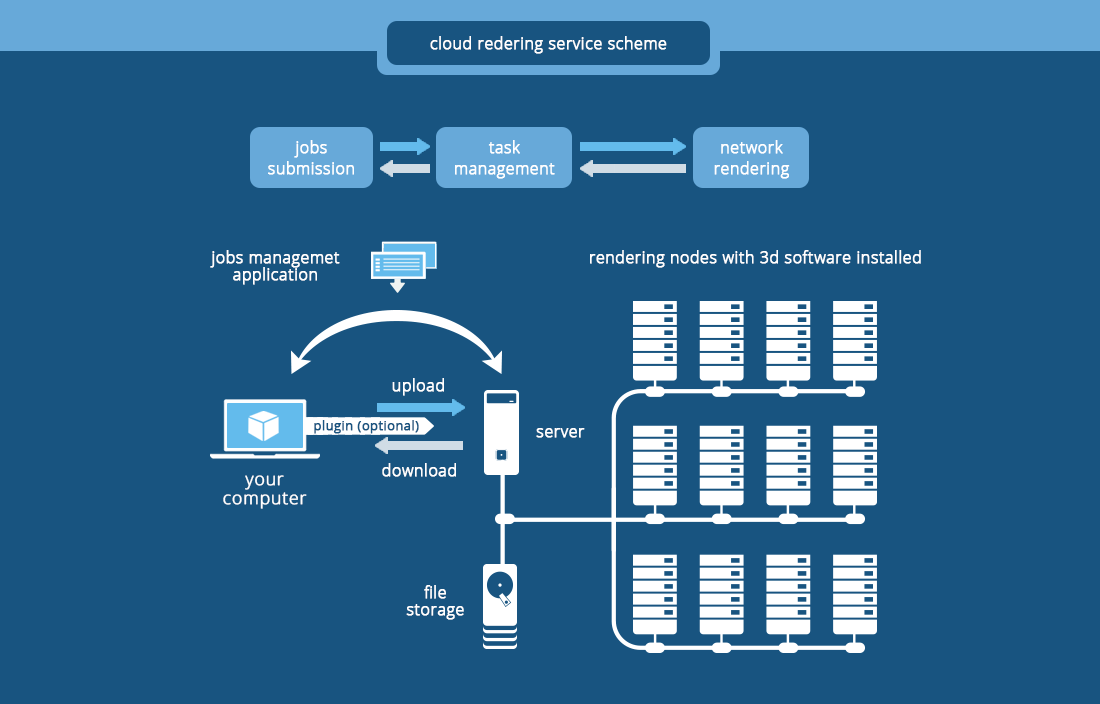
Typical Setup: A render farm of multiple nodes, each with 4x RTX 4090 or A100 GPUs.
-
Workload: Rendering frames for a feature film or architectural visualization.
-
Estimated Cost: Typically priced per minute per GPU. A project could cost $5,000 – $50,000, optimized heavily with spot instances.
D. AI Inference and Model Serving
-
Typical Setup: Instances with lower-power GPUs like the T4 or L4, optimized for throughput and energy efficiency.
-
Workload: Serving a trained model to users in a production application.
-
Estimated Cost: Recurring monthly cost of $200 – $2,000+, highly dependent on traffic and model complexity.
G. Conclusion: Building a Cost-Effective GPU Acceleration Strategy
Navigating the landscape of GPU server rental costs is a critical skill for anyone working in computationally intensive fields. The decision is not merely about finding the cheapest hourly rate but about architecting a holistic strategy that aligns with your project’s technical requirements, fault tolerance, and budgetary constraints. By understanding the pricing models, diligently monitoring your usage, and implementing robust optimization practices like leveraging spot instances and auto-shutdown policies, you can harness the transformative power of cloud GPUs in a financially sustainable way.
The market will continue to evolve with new hardware and competitive pricing. The key to long-term success is to maintain a flexible, informed approach, continuously evaluating your workloads and the available options. By doing so, you ensure that your investment in GPU computing directly translates into accelerated innovation and a tangible competitive advantage, rather than unexpected expenses. The power of supercomputing is now at your fingertips; using it wisely is the ultimate challenge.