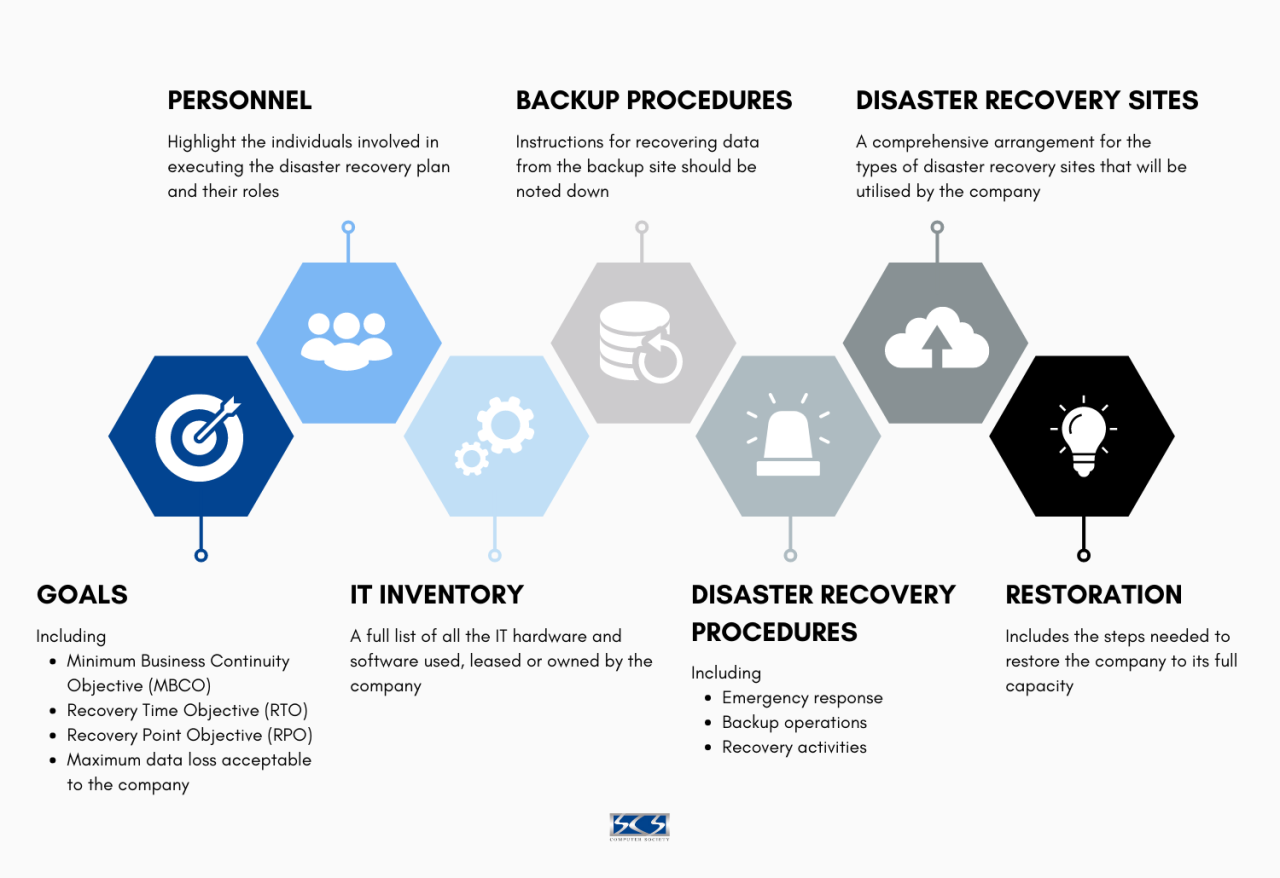
A. The Digital Imperative: Why Every Business Needs a Disaster Recovery Plan
In our increasingly digital-dependent world, the question for modern businesses is not if a disruption will occur, but when. From natural disasters like floods and earthquakes to cyberattacks such as ransomware, hardware failures, and even simple human error, the threats to business continuity are vast and ever-present. A Disaster Recovery Plan (DRP) is a structured, documented strategy that outlines how an organization will resume critical operations and regain access to its data and IT systems following a catastrophic event. It is not a luxury reserved for large corporations; it is a fundamental component of organizational resilience and risk management for any entity that relies on technology to function. This comprehensive guide will serve as both an educational resource and a practical template, walking you through the essential components of creating a robust, actionable disaster recovery plan. We will demystify key concepts, provide a step-by-step framework for development, and emphasize how a well-crafted DRP is not an expense, but a strategic investment in your company’s survival and reputation.
The absence of a DRP can be a death sentence for a business. Statistics consistently show that a significant percentage of companies that experience a major data loss without a recovery plan are forced to shut down within two years. A DRP moves an organization from a state of reactive panic to one of prepared, controlled response, minimizing downtime, financial loss, and damage to customer trust.
B. Foundational Concepts: Understanding RTO and RPO
Before drafting a single line of your plan, you must understand the two most critical metrics that will dictate your strategy and investment.
A. Recovery Time Objective (RTO)
The Recovery Time Objective is the maximum acceptable length of time that your application or service can be offline after a failure. It answers the question: “How quickly must we recover?”
-
Example: An e-commerce website might have an RTO of 4 hours. This means the IT team has 4 hours from the moment of failure to get the site back online and processing orders. A longer RTO allows for cheaper, slower recovery solutions (e.g., restoring from tape backups), while a shorter RTO demands more expensive, immediate failover systems (e.g., a fully redundant hot site).
B. Recovery Point Objective (RPO)
The Recovery Point Objective is the maximum acceptable amount of data loss measured in time. It answers the question: “How much data can we afford to lose?”
-
Example: A financial institution that processes transactions might have an RPO of 15 minutes. This means that in a disaster, losing more than the last 15 minutes of transaction data is unacceptable. This dictates the frequency of your backups or data replication—in this case, requiring near-continuous data replication to a secondary system.
C. The Strategic Relationship Between RTO, RPO, and Cost
These two metrics are the primary drivers of your DRP’s cost and complexity. The following matrix illustrates this relationship:
| RTO/RPO Combination | Implication | Example Solution | Relative Cost |
|---|---|---|---|
| Long RTO/Long RPO (e.g., 24 hrs / 24 hrs) | The business can tolerate a day of downtime and a day of lost data. | Daily backups to external drives, restored to new hardware. | Low |
| Short RTO/Long RPO (e.g., 1 hr / 24 hrs) | Service must be restored quickly, but old data is acceptable. | High-availability server cluster that fails over quickly, with daily backups. | Medium |
| Long RTO/Short RPO (e.g., 24 hrs / 1 min) | The service can be down, but almost no data can be lost. | Frequent, incremental backups to a cloud target with point-in-time recovery. | Medium |
| Short RTO/Short RPO (e.g., 15 min / 1 min) | Mission-critical system requiring near-instant recovery with minimal data loss. | Fully automated, real-time replication to a hot standby site with load balancers ready for failover. | High |

C. A Step-by-Step Disaster Recovery Plan Template
Use the following structure as a template to build your own comprehensive Disaster Recovery Plan.
A. Phase 1: Introduction and Plan Administration
-
Statement of Intent and Objectives: Begin with a formal statement from leadership endorsing the plan. Define its primary goal: to minimize downtime and data loss in a disaster.
-
Scope and Applicability: Clearly define which systems, applications, data, and departments are covered by this plan.
-
Disaster Recovery Team (DRT):
-
Team Lead/Coordinator: The ultimate decision-maker during a disaster.
-
IT Recovery Specialists: Personnel responsible for executing the technical recovery.
-
Communications Officer: Manages all internal and external communications.
-
Business Unit Liaisons: Represent the needs of their respective departments.
-
Contact Information: Include multiple contact methods (work mobile, personal mobile, email) for each team member.
-
B. Phase 2: Risk Assessment and Business Impact Analysis (BIA)
This phase identifies what you are protecting and from what threats.
-
Identify Critical Assets: List all mission-critical systems (e.g., ERP, CRM, email server, domain controllers, file shares).
-
Conduct a Risk Assessment:
-
Natural Disasters: Fire, flood, earthquake, storm.
-
Technical Failures: Server hardware failure, storage array failure, network outage.
-
Human-Caused Events: Accidental deletion, malicious insider attack, ransomware.
-
Cyberattacks: DDoS attacks, data breaches.
-
-
Perform a Business Impact Analysis (BIA): For each critical asset, determine the financial and operational impact of its downtime. This formal process is what you use to scientifically establish your RTO and RPO for each asset.
C. Phase 3: Detailed Recovery Procedures
This is the technical core of the plan—the “how-to” manual for recovery.
-
System-Specific Recovery Steps:
-
A. For Critical Server “XYZ-DB-01”:
-
RTO: 2 hours | RPO: 15 minutes
-
Recovery Location: AWS Cloud (us-east-1)
-
Step-by-Step Procedure:
-
Log in to the AWS Management Console.
-
Navigate to the EC2 service and locate the pre-configured Amazon Machine Image (AMI) for “XYZ-DB-01”.
-
Launch a new instance from this AMI, selecting the appropriate instance type.
-
Attach the most recent EBS snapshot (taken every 15 minutes) to the new instance.
-
Update the DNS record for the database to point to the new instance’s IP address.
-
Execute verification scripts to confirm database integrity and connectivity.
-
-
-
B. For File Share “Company-Files”:
-
RTO: 4 hours | RPO: 1 hour
-
Recovery Location: On-premises standby server.
-
Step-by-Step Procedure:
-
… (and so on for every critical system)
-
-
-
D. Phase 4: Communication and Notification Plan
A failure in communication can compound a technical disaster.
-
Internal Communication: Who needs to be notified and when? (Employees, management, board). Draft template emails and SMS messages.
-
External Communication: Templates for customers, partners, vendors, and regulators. Designate a single spokesperson to ensure message consistency.
-
Public Relations Strategy: How will you handle media inquiries? Prepare a holding statement.
E. Phase 5: Testing, Maintenance, and Continuous Improvement
A plan that is not tested is a plan that is guaranteed to fail.
-
Testing Schedule: Commit to a regular testing schedule (e.g., annually or semi-annually).
-
Types of Tests:
-
Tabletop Exercise: The DR team walks through a simulated disaster scenario verbally.
-
Functional Test: Isolated recovery of a single system.
-
Full-Scale Simulation: A live test of failing over to the recovery site (conducted during a maintenance window).
-
-
Plan Maintenance: Assign an owner to review and update the plan quarterly or whenever there is a significant change to the IT environment.
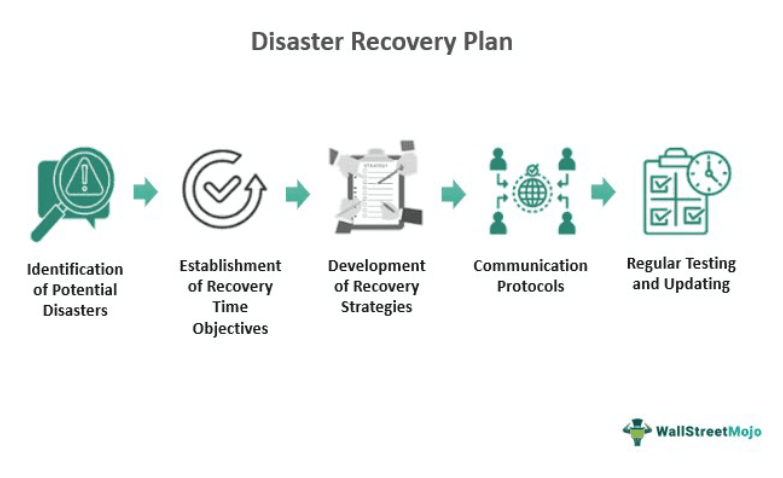
D. Modern Disaster Recovery Solutions and Technologies
The technology landscape for DR has been revolutionized by the cloud.
A. Traditional On-Premises Solutions
-
Backup and Restore: The most basic method. Data is backed up to tape or disk and physically transported to an off-site location. Suitable for high RTO/RPO scenarios.
-
Cold/Warm/Hot Sites:
-
Cold Site: A rudimentary facility with power and cooling, but no hardware. The slowest and cheapest option.
-
Warm Site: Has hardware and network connectivity pre-configured, but data may not be current. A balance of cost and speed.
-
Hot Site: A fully redundant, fully operational data center with real-time data replication. Offers the fastest recovery (lowest RTO) but is the most expensive.
-
B. Cloud-Based Disaster Recovery (DRaaS)
Disaster-Recovery-as-a-Service has become the dominant model due to its cost-effectiveness and flexibility.
-
Pilot Light: A minimal version of your core environment (e.g., just the database and OS configurations) is always running in the cloud. In a disaster, you “light” it by scaling up resources to full production capacity.
-
Warm Standby: A scaled-down but fully functional version of your production environment is always running. This allows for a faster RTO than the pilot light approach.
-
Multi-Site / Hot Standby: A full-scale, production-ready replica of your entire environment runs continuously in the cloud, with load balancers ready to redirect traffic instantly. This achieves the lowest possible RTO and RPO.
E. A Strategic Action Plan for DRP Implementation
To move from theory to practice, follow this project plan.
A. Month 1-2: Initiation and Assessment
-
Secure executive sponsorship.
-
Form the Disaster Recovery Team.
-
Begin the Business Impact Analysis (BIA) to define RTOs and RPOs.
B. Month 3-4: Strategy and Development
-
Based on the BIA, select the appropriate recovery technologies (e.g., opt for a cloud-based Warm Standby solution).
-
Begin drafting the detailed recovery procedures.
-
Select and contract with DR service providers if necessary.
C. Month 5-6: Implementation and Testing
-
Configure the technical recovery infrastructure (e.g., set up replication to the cloud).
-
Finalize the full DRP document.
-
Conduct a tabletop exercise with the entire team.
D. Ongoing: Maintenance and Review
-
Schedule and execute at least one functional test per year.
-
Review and update the plan after any major system change.
F. Conclusion: Building Organizational Resilience for an Uncertain Future
A Disaster Recovery Plan is more than a document; it is a manifestation of an organization’s commitment to resilience, operational excellence, and the trust of its stakeholders. In a digital economy where downtime directly translates to lost revenue and a tarnished reputation, the ability to recover swiftly from a disruption is a formidable competitive advantage. By taking a structured, metrics-driven approach—centered on RTO and RPO—and leveraging modern, cloud-based technologies, businesses of all sizes can develop a cost-effective and robust recovery strategy.
The process of creating and maintaining a DRP requires diligence and investment, but it pales in comparison to the catastrophic cost of being unprepared. Start today. Begin with the Business Impact Analysis, assemble your team, and use this template as your guide. The ultimate goal is not just to create a plan, but to foster a culture of preparedness that ensures your business can withstand the unexpected and emerge stronger on the other side. Your future resilience depends on the actions you take now.