A. The Next Evolution: Introducing Windows Server 2025
In the ever-evolving landscape of enterprise IT, where hybrid cloud models dominate and security threats grow more sophisticated, the release of a new server operating system is a pivotal event. Windows Server 2025, the latest offering from Microsoft, is not merely an incremental update but a significant leap forward, designed to meet the complex demands of the modern data center and the cloud-native edge. Building upon the solid foundation of Windows Server 2022, this new iteration introduces a host of groundbreaking features focused on enhanced security, seamless Azure hybrid integration, superior application platform capabilities, and streamlined management. This exhaustive review will dissect Windows Server 2025, providing a deep dive into its new functionalities, performance improvements, and the tangible business value it delivers to organizations of all sizes. We will explore how it stands to redefine server management, fortify security postures, and serve as the cornerstone for the next generation of IT infrastructure.
The development of Windows Server 2025 has been clearly guided by several key industry trends: the unstoppable shift to hybrid cloud, the critical need for zero-trust security architectures, and the demand for greater operational efficiency through automation. This release demonstrates Microsoft’s commitment to providing a unified platform that bridges on-premises data centers with Azure cloud services, offering unparalleled flexibility and control to IT administrators and business leaders alike.
B. Foundational Architecture and Deployment Options
Windows Server 2025 continues to offer the flexible deployment models that administrators are familiar with, but with enhanced capabilities in each.
A. Core Editions and Licensing
Understanding the available editions is crucial for selecting the right fit for your organizational needs and budget.
-
Windows Server 2025 Datacenter: This is the premium edition designed for highly virtualized datacenter and cloud environments. It includes unlimited virtualized container instances and provides comprehensive features like Storage Spaces Direct and Software Defined Networking. It is the ideal choice for large-scale virtualization and private cloud scenarios.
-
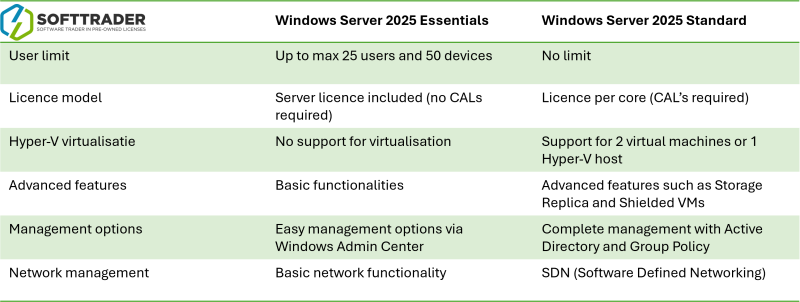
Windows Server 2025 Standard: This edition is suited for physical or minimally virtualized environments. It includes the same core features as Datacenter but is limited to two virtualized container instances. For organizations with predictable workloads and limited virtualization needs, Standard edition offers a cost-effective solution.
-
Windows Server 2025 Essentials: Geared towards small businesses, this edition is limited to 25 users and 50 devices. It provides a simplified server experience for core networking, file storage, and user management tasks.
B. Installation Models
The choice of installation model impacts manageability, security, and resource overhead.
-
Server with Desktop Experience: This is the full installation with the traditional Windows desktop GUI (Graphical User Interface). It is familiar for administrators who prefer graphical tools but carries a larger footprint and attack surface.
-
Server Core: This is the recommended installation option. It provides a minimal installation with a smaller footprint, reduced servicing requirements, and a significantly reduced attack surface. Management is performed primarily via PowerShell, Windows Admin Center, or remote management tools.
-
Nano Server: Previously an option, Nano Server is now available as a container base image rather than a separate host operating system installation option. This aligns with the industry-wide shift towards containerized applications.
C. Deep Dive into Groundbreaking New Features
Windows Server 2025 is packed with innovative features that address real-world challenges faced by IT professionals.
A. Advanced Security Capabilities
Security is the centerpiece of this release, with a strong emphasis on a “zero-trust” architecture.
-
Hotpatching for More Roles: Building on the initial release in Windows Server 2022, hotpatching is now extended to a broader set of server roles. This allows administrators to install security updates without requiring a reboot, dramatically improving server uptime and service availability for critical workloads.
-
Enhanced Secure Boot with Measured Boot: The secure boot process has been fortified, providing stronger protection against rootkits and boot-level malware. When combined with Measured Boot, which logs the entire boot process, it offers a robust chain of trust that can be verified by a remote server, a key tenet of zero-trust.
-
Microsoft Defender for Identity Integration: Native integration with Microsoft Defender for Identity provides advanced, cloud-powered security for your Active Directory environment. It can detect and alert on sophisticated attacks targeting identity stores in real-time.
-
SMB Over QUIC: This revolutionary feature allows for secure, reliable Server Message Block (file sharing) connections over the internet without the need for a VPN. It uses TLS 1.3 encryption, effectively making your file shares accessible securely from anywhere as if they were on a local network.
B. Unprecedented Hybrid Cloud Integration with Azure Arc
Azure Arc is the glue that binds your on-premises and multi-cloud environments to Azure’s management plane.
-
Centralized Management: Azure Arc allows you to manage Windows Server 2025 instances alongside your Azure virtual machines from a single, unified Azure Portal. You can view inventory, assign tags, and manage policies across your entire estate.
-
Azure Automanage: This service automates routine management tasks such as backup, monitoring, and security configuration for your Arc-enabled servers, applying Azure best practices consistently to your on-premises infrastructure.
-
Extended Security Updates (ESU) Management: For older servers nearing end-of-support, Arc provides a streamlined way to purchase and manage Extended Security Updates directly through the Azure portal.
C. Hyper-V Virtualization Enhancements
The hypervisor receives significant upgrades to performance, security, and compatibility.
-
Support for Nested Virtualization on AMD Processors: Previously limited to Intel, nested virtualization (running a hypervisor inside a virtual machine) is now fully supported on AMD EPYC processors, providing greater flexibility for development, testing, and containerized scenarios.
-
Faster Live Migration: Enhancements to the Live Migration process reduce downtime and network overhead during the movement of virtual machines between hosts, ensuring higher availability and more efficient resource balancing.
-
Enhanced VM Isolation: New security features provide stronger isolation for virtual machines, protecting them from potential threats originating from the host or other VMs on the same hardware.
D. Streamlined Management with Windows Admin Center
Windows Admin Center (WAC) continues to evolve as the modern, browser-based tool for managing Windows Server.
-
Enhanced Performance Monitoring: WAC now offers more granular and historical performance data, making it easier to diagnose bottlenecks and plan for capacity.
-
Improved Extension Ecosystem: A growing catalog of extensions allows WAC to manage not just Windows Server, but also Azure services, software-defined storage, and network equipment from a single pane of glass.
-
Simplified Azure Integration: The bridge between your on-premises WAC and Azure services is more seamless than ever, facilitating easy use of Azure Backup, Azure Monitor, and Azure Security Center directly from the WAC interface.
D. Performance and Scalability Improvements
Windows Server 2025 is engineered for the workloads of tomorrow, delivering measurable performance gains.
A. Support for the Latest Hardware
The OS is optimized to take full advantage of new hardware technologies:
-
Latest CPU Architectures: Full support for the newest Intel Xeon Scalable (Granite Rapids) and AMD EPYC (Turin) processors, including their advanced instruction sets and security features.
-
Persistent Memory (PMem): Enhanced support for Intel Optane PMem allows for even larger in-memory databases and faster transaction processing by using the persistent memory as a tier between RAM and storage.
-
NVMe Drives and Storage Spaces Direct: Improved algorithms for Storage Spaces Direct (S2D) deliver better performance and lower latency when using NVMe drives, making hyper-converged infrastructure (HCI) deployments more powerful than ever.
B. Networking Performance
The networking stack has been overhauled for speed and efficiency.
-
TCP Performance: Improvements to the TCP stack result in higher throughput and lower latency for network-intensive applications.
-
Dynamic Processing of Network Packets: Reduces CPU overhead associated with processing high volumes of network traffic, freeing up processor cycles for application workloads.

E. A Strategic Verdict: Who Should Upgrade to Windows Server 2025?
The decision to upgrade is strategic and depends on your current environment and future goals.
A. Prime Candidates for an Immediate Upgrade
-
Organizations with Windows Server 2012 R2 / 2016: These systems are at or nearing end-of-support. Upgrading to Server 2025 is the most secure and feature-rich path forward.
-
Businesses Embracing Hybrid Cloud: If your strategy involves integrating on-premises infrastructure with Azure, the native Arc and cloud integration features in Server 2025 provide unparalleled value.
-
Security-Conscious Enterprises: For those in regulated industries or with a strong focus on a zero-trust model, the advanced security features like hotpatching and SMB over QUIC are worth the upgrade alone.
-
High-Performance Computing (HPC) and VDI Deployments: The enhancements in Hyper-V and support for the latest hardware make it ideal for demanding virtualization workloads.
B. Considerations for a Phased Rollout
-
Stable Windows Server 2019/2022 Environments: If your current environment is stable, well-understood, and meets all your business needs, a business-case-driven, phased approach is prudent.
-
Application Compatibility: As with any major OS upgrade, thorough testing of all business-critical applications in a non-production environment is an absolute necessity before deployment.
F. Conclusion: The Definitive Platform for the Modern Hybrid Era
Windows Server 2025 is a landmark release that successfully addresses the key IT challenges of this decade. It is more than just an operating system; it is a comprehensive platform that seamlessly spans from the deepest recesses of your on-premises data center to the vast expanse of the Microsoft Azure cloud. Its unwavering focus on security through features like expanded hotpatching and SMB over QUIC provides a much-needed fortified defense for modern enterprises. The deep Azure Arc integration finally delivers on the promise of a truly unified hybrid cloud management experience, reducing operational complexity and overhead.
For any organization looking to modernize its infrastructure, bolster its security posture, and build a scalable foundation for future innovation, Windows Server 2025 is not just a recommended path—it is the definitive choice. It represents a mature, powerful, and intelligent evolution of the Windows Server lineage, expertly crafted to empower businesses to thrive in a cloud-first, security-conscious world. The investment in upgrading will pay dividends in enhanced security, operational efficiency, and strategic flexibility for years to come.