
A. The Strategic Value of Affordable Dedicated Servers in Modern Business
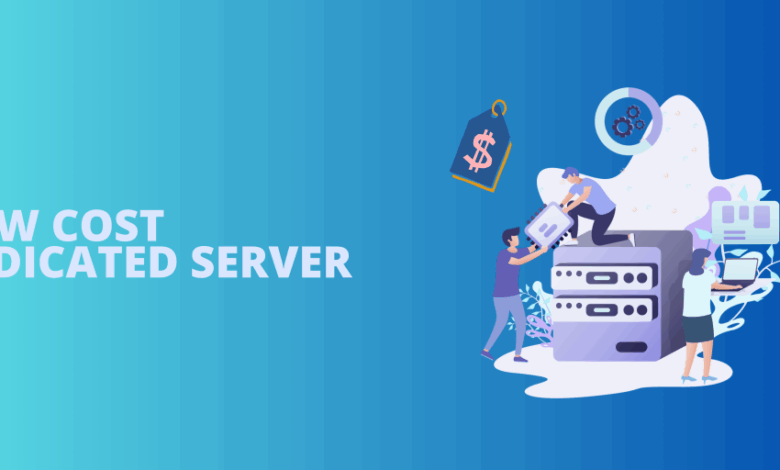
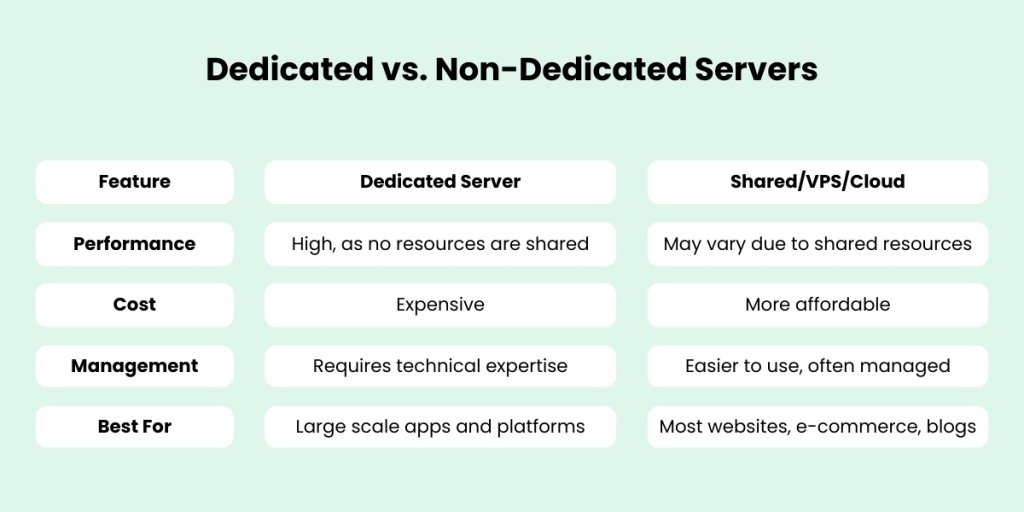
In the relentless pursuit of optimal online performance, businesses often face a critical infrastructure crossroads: how to harness the raw power of enterprise-grade hardware without succumbing to prohibitive costs. The market for cheap dedicated servers has matured significantly, offering a compelling solution that bridges the gap between constrained virtual environments and exorbitant premium hosting. A dedicated server provides exclusive access to an entire physical machine—a singular advantage for resource-intensive applications, large-scale databases, and high-traffic web properties. This comprehensive guide delves deep into the world of affordable dedicated server solutions, demystifying how to identify genuine value, avoid common pitfalls, and select a provider that delivers robust performance without compromising your financial constraints. We will explore the technical specifications that matter most, analyze leading budget-friendly providers, and provide a strategic framework for making an informed purchasing decision that aligns with both your technical requirements and fiscal responsibility.
The evolution of the hosting industry has made dedicated resources more accessible than ever before. While “cheap” can sometimes evoke concerns about reliability or support, the competitive landscape has forced reputable providers to offer compelling entry-level and mid-range server configurations at aggressive price points. This shift empowers small and medium-sized businesses, developers, and growing startups to leverage the stability, security, and performance of bare-metal hardware, which was once the exclusive domain of large corporations. Understanding the nuances of this market is key to unlocking this power for your own projects.
B. Deconstructing the True Cost of a Dedicated Server
To accurately assess “cheap” deals, one must first understand the components that constitute the total cost of ownership (TCO) of a dedicated server. The monthly sticker price is often just the beginning.
A. Hardware Specifications: The Core of Performance
The CPU, RAM, and storage drive the majority of the server’s cost and performance.
-
CPU (Processor): Look at the processor model, core count, and clock speed. Older generation Intel Xeon E3/E5 or AMD EPYC processors often power budget servers and provide excellent value for most workloads. Understand the difference between dedicated cores and hyper-threaded cores.
-
RAM (Memory): The amount and type of RAM (e.g., DDR3 vs. DDR4) are critical. ECC (Error-Correcting Code) memory, which detects and corrects common types of data corruption, is a sign of a quality server but may be absent in the very cheapest tiers.
-
Storage Type and Configuration: This is a major differentiator.
-
HDD (Hard Disk Drives): Offer large capacities at a low cost but are slow for I/O-intensive tasks.
-
SATA SSD (Solid State Drives): Provide a significant speed boost over HDDs for operating systems and applications at a moderate cost.
-
NVMe SSD (Non-Volatile Memory Express): The current gold standard for speed, offering read/write speeds that are multiple times faster than SATA SSDs. Their presence in a budget server indicates a high-value deal.
-
RAID Configuration: A hardware RAID card (e.g., RAID 1 for mirroring) provides data redundancy and can improve performance, but often costs extra.
-
B. Bandwidth and Network Connectivity
-
Data Transfer Allowance: Providers may offer “unmetered” bandwidth (you pay a flat fee regardless of usage) or a capped amount (e.g., 10TB per month). For high-traffic sites, unmetered plans are often more predictable and cost-effective.
-
Port Speed: This is the maximum speed of your server’s network connection (e.g., 1 Gbps vs. 10 Gbps). Ensure it meets your needs for handling traffic spikes.
-
Network Uptime and Quality: A 99.9% uptime guarantee is standard. Research the provider’s network infrastructure and peering agreements to ensure low latency and reliable connectivity.
C. Management Level and Support Services
This is a critical cost and responsibility factor.
-
Unmanaged Server: You are responsible for all software installation, security patching, kernel updates, monitoring, and troubleshooting. This offers the lowest cost but requires significant system administration expertise.
-
Managed Server: The provider’s team handles all technical administration, including setup, security, updates, and support. This comes at a premium price but frees you to focus on your business.
-
Semi-Managed Server: A middle ground where the provider handles basic hardware and network support but leaves software management to you.
D. Additional Fees and Hidden Costs
-
Setup Fees: Some providers waive setup fees for monthly contracts, while others charge a one-time installation cost.
-
Control Panels: Licenses for popular control panels like cPanel/WHM or Plesk can add $15-$40 per month to your bill.
-
IP Addresses: The base price typically includes one IPv4 address. Additional IPs cost extra per month.
-
Backup Services: Automated, off-server backup solutions are crucial for disaster recovery and are almost always a paid add-on.
-
Operating System (OS) Licensing: While most Linux distributions are free, proprietary OSs like Windows Server require a monthly license fee.

C. Analyzing Top Providers for Budget Dedicated Server Deals
Based on a comprehensive evaluation of the market, here is an analysis of providers known for offering strong value in the affordable dedicated server space.
A. OVHcloud: The Industrial-Grade Value Leader
OVHcloud operates its own data centers and designs its own hardware, allowing it to offer exceptionally competitive prices on a massive scale.
-
Strengths: Unbeatable price-to-performance ratio, high-bandwidth unmetered options, a vast array of server configurations, strong global presence, and DDoS protection included by default.
-
Considerations: Support can be less personalized than with smaller providers, and the billing interface can be complex for beginners. Primarily unmanaged.
-
Ideal For: Tech-savvy users, developers, and businesses that need raw power and bandwidth at the lowest possible cost and can handle self-management.
-
Sample Deal: Rise-1 – Intel Xeon E5, 16GB RAM, 2x 480GB SSD, 500 Mbps unmetered bandwidth.
B. Hetzner Online: The European Powerhouse
Hetzner is renowned for its high-quality hardware, transparent pricing, and exceptional value, particularly within its German and Finnish data centers.
-
Strengths: Extremely competitive pricing, modern hardware (often featuring AMD EPYC and Intel Xeon E3 processors), user-friendly customer portal, and a robust auction system for even cheaper used servers.
-
Considerations: Data centers are primarily in Europe, which may not be ideal for a North American or Asian audience. Support is competent but may not be as readily available as with 24/7 phone support providers.
-
Ideal For: European businesses, price-conscious users seeking modern hardware, and those who appreciate a straightforward, no-nonsense approach.
-
Sample Deal: AX41 – AMD Ryzen 5 3600, 64GB RAM, 2x 512GB NVMe SSD, 1 Gbps unmetered bandwidth.
C. IONOS (by 1&1): The User-Friendly All-Rounder
IONOS strikes a balance between affordability and accessibility, making dedicated servers approachable for users migrating from VPS or shared hosting.
-
Strengths: Very aggressive introductory prices, includes a easy-to-use management interface, DDoS protection, and Windows Server license in some plans. Offers 24/7 phone support.
-
Considerations: Renewal prices can be significantly higher than the initial term. The hardware specifications can be less transparent than with other providers.
-
Ideal For: Small businesses, first-time dedicated server users, and those who need a managed experience with strong support and are comfortable with potentially higher long-term costs.
-
Sample Deal: Intel Xeon E3 – Intel Xeon E3-1225v5, 8GB RAM, 2x 480GB SSD, unlimited traffic.
D. Contabo: The Budget Capacity Specialist
Contabo has built its reputation on providing servers with unusually high amounts of RAM and storage for a very low monthly price.
-
Strengths: Outstanding value in terms of RAM and storage allocation, simple pricing, and a variety of configuration options. Good for memory-intensive applications.
-
Considerations: The network and I/O performance on their base plans may not match the throughput of providers like OVHcloud or Hetzner. Setup fees can apply.
-
Ideal For: Applications that require large amounts of memory (e.g., database servers, caching systems) or storage capacity without the need for the highest possible disk I/O.
-
Sample Deal: DS S – Intel Core i7, 32GB RAM, 800GB SSD, unmetered bandwidth.

D. A Strategic Framework for Selecting Your Server
Navigating the options requires a methodical approach. Follow this decision-making framework to find your ideal cheap dedicated server.
A. Step 1: Perform a Rigorous Needs Assessment
-
Workload Analysis: What applications will you run? A database server needs fast NVMe storage and ample RAM. A web server needs strong single-core CPU performance. A file server requires large HDD capacity.
-
Traffic and Bandwidth Projections: Estimate your monthly data transfer needs. If you expect consistent high traffic, an unmetered plan is safer. For predictable, lower traffic, a metered plan may be cheaper.
-
Technical Expertise Audit: Be brutally honest. Do you have a system administrator on staff? If not, a managed or semi-managed solution is not an extra cost; it is a necessary investment.
B. Step 2: Differentiate Between Genuine Value and False Economy
-
Prioritize Performance per Dollar: Don’t just look at the price. A $50/month server with an NVMe SSD will vastly outperform a $45/month server with a SATA SSD for most applications, making it the better value.
-
Scrutinize the Fine Print: Read the Terms of Service (ToS) and Service Level Agreement (SLA). What does the uptime guarantee actually cover? What are the policies on fair usage for “unmetered” bandwidth?
-
Plan for the Total Cost of Ownership (TCO): Calculate the monthly cost including all necessary add-ons: control panel, backups, additional IPs, and OS licensing. Compare this final TCO between providers.
C. Step 3: Validate Provider Reliability and Support
-
Research Independent Reviews: Look for user feedback on forums like WebHostingTalk, Reddit, and Trustpilot. Pay attention to comments about network stability and support responsiveness.
-
Test Pre-Sales Support: Contact the sales teams of your shortlisted providers with a technical question. The speed and quality of their response are a strong indicator of their post-sales support.
-
Check for Red Flags: Be wary of providers with a history of frequent outages, opaque billing practices, or poorly documented infrastructure.
E. Optimizing Your Budget Server for Maximum Performance
Once you’ve procured your server, you can extract even more value through optimization.
A. Operating System and Software Optimization
-
Choose a lightweight Linux distribution (like Alpine Linux or a minimal CentOS install) if you don’t need a full graphical interface.
-
Use a lean web server like Nginx instead of Apache for static content and reverse proxying.
-
Implement caching at every level: Opcode caching (OPcache for PHP), object caching (Redis), and page caching (Varnish).
B. Security Hardening on an Unmanaged Server
Since budget servers are often unmanaged, security is your responsibility.
-
Configure a firewall (e.g., UFW or iptables) to block all ports except those explicitly required (SSH, HTTP, HTTPS).
-
Disable password-based SSH logins and use key-based authentication exclusively.
-
Set up an automated system for applying security updates (e.g., with
unattended-upgradeson Ubuntu). -
Install and configure an intrusion detection system (IDS) like Fail2Ban.
C. Implementing a Robust Backup Strategy
Your provider’s backup solution costs extra, but you can create a low-cost DIY strategy.
-
Use scripts to perform regular database and file system dumps.
-
Sync these backups to a remote, object storage service like AWS S3, Backblaze B2, or Wasabi, which are very cost-effective for storage.
F. Conclusion: Empowering Your Business with Strategic Infrastructure Investment
Finding a cheap dedicated server is not about simply locating the lowest price tag; it is a strategic exercise in identifying the optimal intersection of performance, reliability, and cost. The market in 2024 offers unprecedented opportunities for businesses of all sizes to leverage the power of dedicated hardware. By understanding the true components of cost, critically evaluating providers like OVHcloud, Hetzner, and IONOS based on your specific needs, and taking ownership of server optimization and security, you can build a powerful, scalable, and resilient online foundation.
This investment in a dedicated environment will pay dividends in the form of enhanced website performance, improved search engine rankings due to faster page loads, superior security for customer data, and the peace of mind that comes with a stable hosting platform. Take a calculated approach, look beyond the initial monthly fee, and choose a partner that will support your growth. The right affordable dedicated server is not an expense; it is a catalyst for your digital success.