A. The Critical Imperative of High Availability in the Digital Economy
In today’s hyper-connected world, where digital services form the backbone of commerce, communication, and operations, unexpected downtime is not merely an inconvenience—it is a direct threat to revenue, reputation, and customer trust. The concept of High Availability (HA) has therefore evolved from a luxury for large enterprises to a fundamental requirement for any business with an online presence. High Availability refers to a system design approach and associated service implementation that ensures an agreed level of operational performance, typically uptime, will be met over a specific period. The goal is to minimize or completely eliminate single points of failure, creating a resilient infrastructure that can withstand hardware malfunctions, software crashes, and even data center outages without disrupting service to the end-user. This comprehensive guide will serve as your definitive resource for understanding, designing, and implementing a robust High Availability setup, providing a detailed blueprint to transform your fragile single-server environment into a fault-tolerant, resilient system capable of delivering 99.99% uptime or higher.
The pursuit of High Availability is not about preventing failures—all hardware and software will eventually fail—but about building a system that can gracefully withstand and recover from those failures automatically. This involves a strategic combination of redundant components, intelligent software, and proven architectural patterns. We will explore everything from fundamental concepts and core components to advanced implementation strategies for web servers, databases, and applications, empowering you to build a digital fortress for your critical services.
B. Deconstructing High Availability: Core Principles and Metrics
To build a highly available system, one must first understand the foundational principles and the metrics used to measure its effectiveness.
A. The Pillars of High Availability Design
Several key principles form the bedrock of any reliable HA architecture:
-
Elimination of Single Points of Failure (SPOF): This is the golden rule. Every component in your system—from power supplies and network switches to application servers and databases—must have a redundant counterpart ready to take over in case of failure.
-
Reliable Failover: The process of automatically switching to a redundant system upon the detection of a failure must be fast, reliable, and thoroughly tested. This includes both automatic and manual failover procedures.
-
Failure Detection: The system must have a robust and rapid mechanism for detecting when a component has failed. This is often achieved through heartbeat networks and health checks.
-
Shared-Nothing Architecture: Where possible, nodes in a cluster should be independent and share no state. This prevents the failure of one node from affecting others and simplifies the failover process.
B. Quantifying Availability: The “Nines” of Uptime
Availability is typically expressed as a percentage of uptime in a given year. This is often referred to as the “nines.”
-
99% Availability: Allows for approximately 3 days, 15 hours, and 36 minutes of downtime per year.
-
99.9% Availability (“Three Nines”): Allows for approximately 8 hours, 45 minutes, and 57 seconds of downtime per year.
-
99.99% Availability (“Four Nines”): Allows for approximately 52 minutes and 36 seconds of downtime per year.
-
99.999% Availability (“Five Nines”): Allows for approximately 5 minutes and 15 seconds of downtime per year.
Achieving higher levels of availability requires exponentially more complex and expensive infrastructure, with a focus on eliminating every possible SPOF, including power, network, and even geographic location.
C. The Core Components of a High Availability Architecture
Building an HA system requires the integration of several key technological components, each playing a specific role in maintaining service continuity.
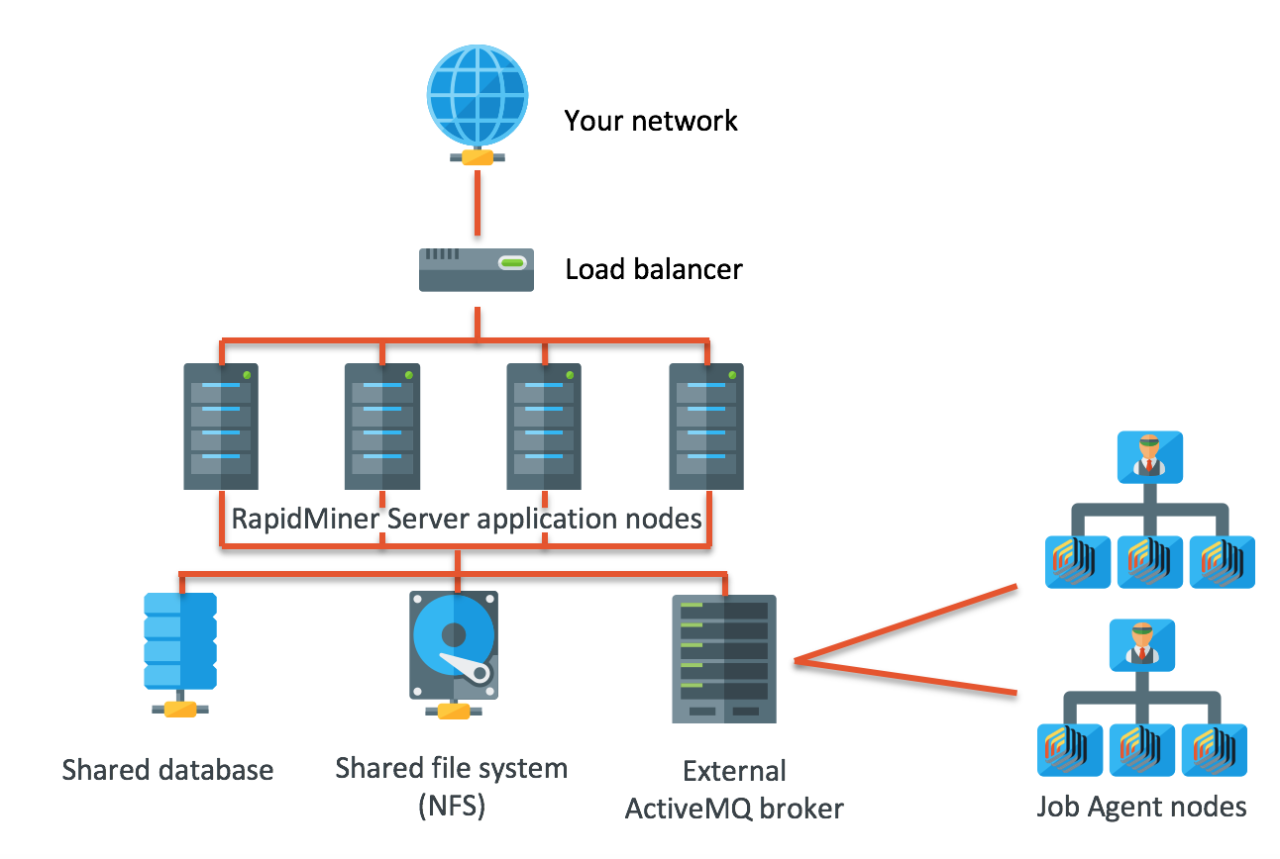
A. Load Balancers: The Traffic Directors
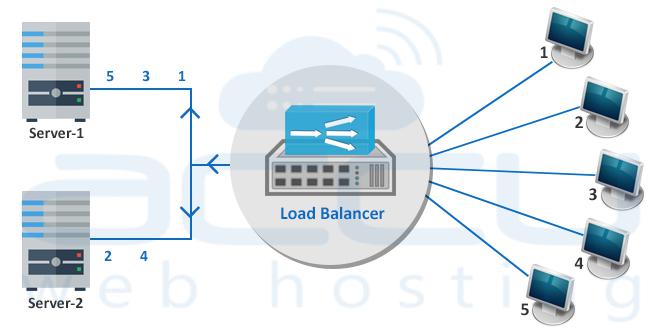
The load balancer is the public face of your HA cluster. It distributes incoming client requests across a pool of backend servers.
-
Function: Prevents any single server from becoming overloaded and provides a single entry point (Virtual IP) for the service.
-
Health Checks: Continuously probes backend servers to ensure they are healthy. If a server fails its health check, the load balancer automatically stops sending traffic to it.
-
Solutions: HAProxy (open-source, highly configurable), Nginx (can function as a capable load balancer), and commercial solutions from F5 Networks (BIG-IP) or Citrix (ADC).
B. Clustering and Heartbeat Mechanisms
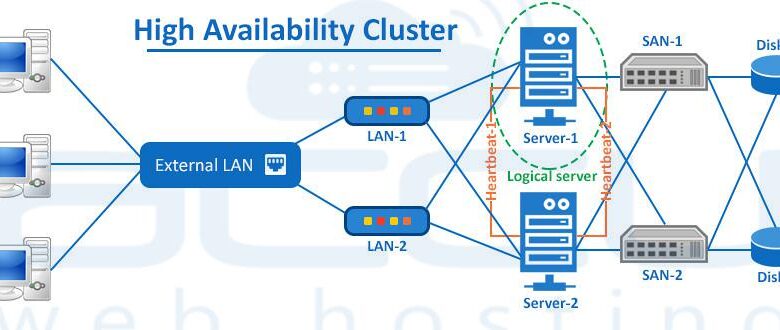
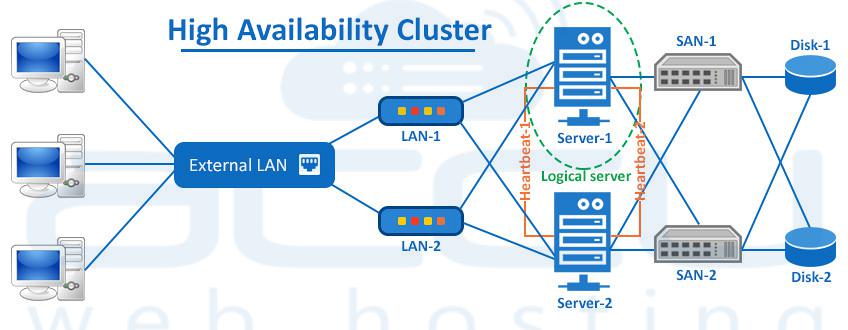
This is the “brain” of the HA setup, responsible for monitoring node health and orchestrating failover.
-
Function: A cluster of servers uses a dedicated private network (a “heartbeat” channel) to continuously exchange “I’m alive” messages. If the primary node stops sending these messages, a secondary node promotes itself to active status.
-
Solutions: Pacemaker and Corosync are the industry-standard open-source stack for building highly available clusters. They manage resources (like Virtual IPs and services) and execute the failover policy. Keepalived is a simpler, lighter-weight alternative often used for less complex scenarios, typically for managing a Virtual IP between two nodes.
C. Shared or Replicated Storage
For stateful services (like databases), all nodes in the cluster must have access to the same data to ensure consistency after a failover.
-
Shared Storage: A dedicated storage area network (SAN) or network-attached storage (NAS) that multiple servers can access simultaneously. This is simple but can become a SPOF if not designed with redundancy.
-
Replicated Storage: Data is synchronously or asynchronously copied between the storage of each node. This is more complex but eliminates the shared storage SPOF.
-
Solutions: DRBD (Distributed Replicated Block Device) for block-level replication, GlusterFS, and Ceph for distributed file systems.
D. Redundant Network Infrastructure
Network connectivity is a common SPOF.
-
Implementation: Use multiple network interface cards (NICs) bonded together for redundancy. Connect servers to multiple switches. Employ multiple internet connections from different providers (multi-homing).
D. Implementing High Availability for Common Service Types
The implementation details vary significantly depending on the service you are making highly available.
A. High Availability for Web Servers (Stateless Layer)
This is the most straightforward HA scenario because web servers are typically stateless; they don’t store unique user data locally.
-
Architecture:
-
Deploy multiple identical web servers (e.g., running Nginx or Apache) behind a load balancer (HAProxy or an external cloud load balancer).
-
Ensure all web servers connect to the same backend database or shared file system for user uploads.
-
Configure the load balancer to perform HTTP health checks (e.g., requesting
/health.php) on each web server. -
Use a distributed cache like Redis or Memcached for session storage. Storing sessions locally on a web server would break the user experience if that server failed.
-
-
Result: If one web server fails, the load balancer detects it and routes all new traffic to the remaining healthy servers. Users may experience a momentary blip but will not be logged out or lose data.
B. High Availability for Databases (Stateful Layer)
This is more complex due to the critical nature of data consistency.
-
Architecture: Active-Passive (Master-Slave) with Pacemaker/Corosync:
-
Set up two database servers (e.g., MySQL or PostgreSQL) in a master-slave replication configuration.
-
Use Pacemaker and Corosync to manage a Virtual IP (VIP) that points to the master database.
-
Configure Pacemaker to monitor the master database service. If it fails, Pacemaker will:
-
Stop the database service on the failed master.
-
Promote the slave to be the new master.
-
Reconfigure replication (if necessary).
-
Move the Virtual IP to the new master server.
-
-
The application always connects to the VIP, so it is unaware of which physical server is the current master.
-
-
Alternative: For more advanced setups, consider Galera Cluster for MySQL/MariaDB, which provides a multi-master, synchronous replication solution.
C. High Availability for Applications and APIs
The principles are similar to web servers, but with additional considerations for background jobs and queues.
-
Architecture:
-
Run multiple instances of your application server across different physical machines or virtualized environments.
-
Place them behind a load balancer with appropriate health checks.
-
Externalize all state: use a shared database, external session storage (Redis), and a distributed message queue (RabbitMQ or Apache Kafka in a cluster) for background jobs.
-
Ensure your application is designed to be “12-factor” compliant, meaning it is stateless and disposable, making it perfectly suited for an HA environment.
-
E. Advanced High Availability Strategies
For mission-critical applications requiring the highest levels of uptime, more advanced strategies are necessary.
A. Geographic Redundancy (Disaster Recovery)
Protecting against a catastrophic failure of an entire data center requires distributing your HA cluster across multiple geographic locations.
-
Active-Passive DR: A fully redundant stack is running in a secondary data center but is idle. DNS is manually switched (or automated via GSLB) in the event of a primary data center failure.
-
Active-Active Multi-Region: The application runs simultaneously in multiple regions, with a Global Server Load Balancer (GSLB) routing users to the closest healthy region. This provides the highest level of fault tolerance and performance but is extremely complex to implement correctly, especially for stateful services.
B. Automated Failover and “Split-Brain” Prevention
A “split-brain” scenario occurs when both nodes in a two-node cluster believe they are the active node, often due to a failure in the heartbeat network. This can lead to data corruption.
-
Prevention: Use multiple, physically separate heartbeat links. Implement a fencing mechanism (also called STONITH – “Shoot The Other Node In The Head”). Fencing forcibly powers off the malfunctioning node to ensure it cannot continue to operate and cause data corruption. This is a non-negotiable requirement for a production HA cluster.
F. A Step-by-Step Implementation Plan for a Basic HA Cluster
This is a practical guide for setting up a simple two-node active-passive HA cluster for a service like a web server or database.
A. Phase 1: Foundation and Prerequisites
-
Hardware/VM Setup: Provision two identical servers (Node A and Node B) with the same OS (e.g., Ubuntu 22.04 LTS).
-
Network Configuration: Ensure each node has at least two network interfaces: one for the public network and one for a private, dedicated heartbeat network.
-
Software Installation: Install the necessary application (e.g., Nginx, MySQL) on both nodes.
B. Phase 2: Cluster Stack Installation and Configuration
-
Install the cluster stack on both nodes:
apt-get install pacemaker corosync pcs. -
Configure the Corosync communication layer to use the private heartbeat network.
-
Authenticate the nodes and form the cluster using the
pcscommand-line tool.
C. Phase 3: Resource and Constraint Configuration
-
Define cluster resources for your service. For example:
-
pcs resource create Virtual_IP ocf:heartbeat:IPaddr2 ip=192.168.1.100 cidr_netmask=24 -
pcs resource create WebServer systemd:nginx
-
-
Create a colocation constraint to ensure the WebServer resource always runs on the same node as the Virtual_IP.
-
Create an ordering constraint to ensure the Virtual_IP is started before the WebServer.
D. Phase 4: Testing and Validation
-
Bring the cluster online and verify both resources are running on your preferred primary node (Node A).
-
Test Failover: Simulate a failure by forcefully shutting down Node A or disconnecting its network.
-
Observe: Use
pcs statusto watch as Pacemaker detects the failure and relocates the Virtual_IP and WebServer resources to Node B. -
Validate: From a client machine, confirm you can still access the service via the Virtual IP.
-
Test Failback: Once Node A is recovered, test the process of moving resources back to it.
G. Conclusion: Building Resilience as a Core Competency
Implementing a High Availability setup is a journey that requires careful planning, a deep understanding of your application’s architecture, and meticulous execution. It is an investment that pays for itself the first time a critical component fails without causing a service outage. By systematically eliminating single points of failure, implementing robust clustering software, and designing your applications for redundancy, you can build systems that are not only highly available but also more scalable and easier to maintain.
Remember, high availability is not a product you can buy; it is an architectural philosophy that must be woven into the fabric of your IT infrastructure. Start by protecting your most critical services, follow the step-by-step plan, rigorously test your failover procedures, and continuously refine your setup. In doing so, you will transform your digital operations from a fragile liability into a resilient, trustworthy asset that can support your business growth for years to come. The ultimate goal is to make downtime a historical footnote, not a recurring crisis.