A. Introduction: The Paradigm Shift in Web Hosting
In the digital age, a business’s online presence is its lifeblood. The foundation of this presence is web hosting, a technology that has undergone a revolutionary transformation. For years, businesses were confined to traditional options like shared or dedicated servers, which often presented a rigid choice between affordability and power. However, the advent of cloud hosting has fundamentally rewritten the rules of the game. But what exactly is cloud hosting, and why has it become the dominant solution for everything from budding blogs to global enterprise applications? This in-depth guide will demystify cloud hosting, exploring its core architecture, myriad benefits, practical use cases, and how it compares to traditional hosting models, providing you with the knowledge to make an informed decision for your online needs.
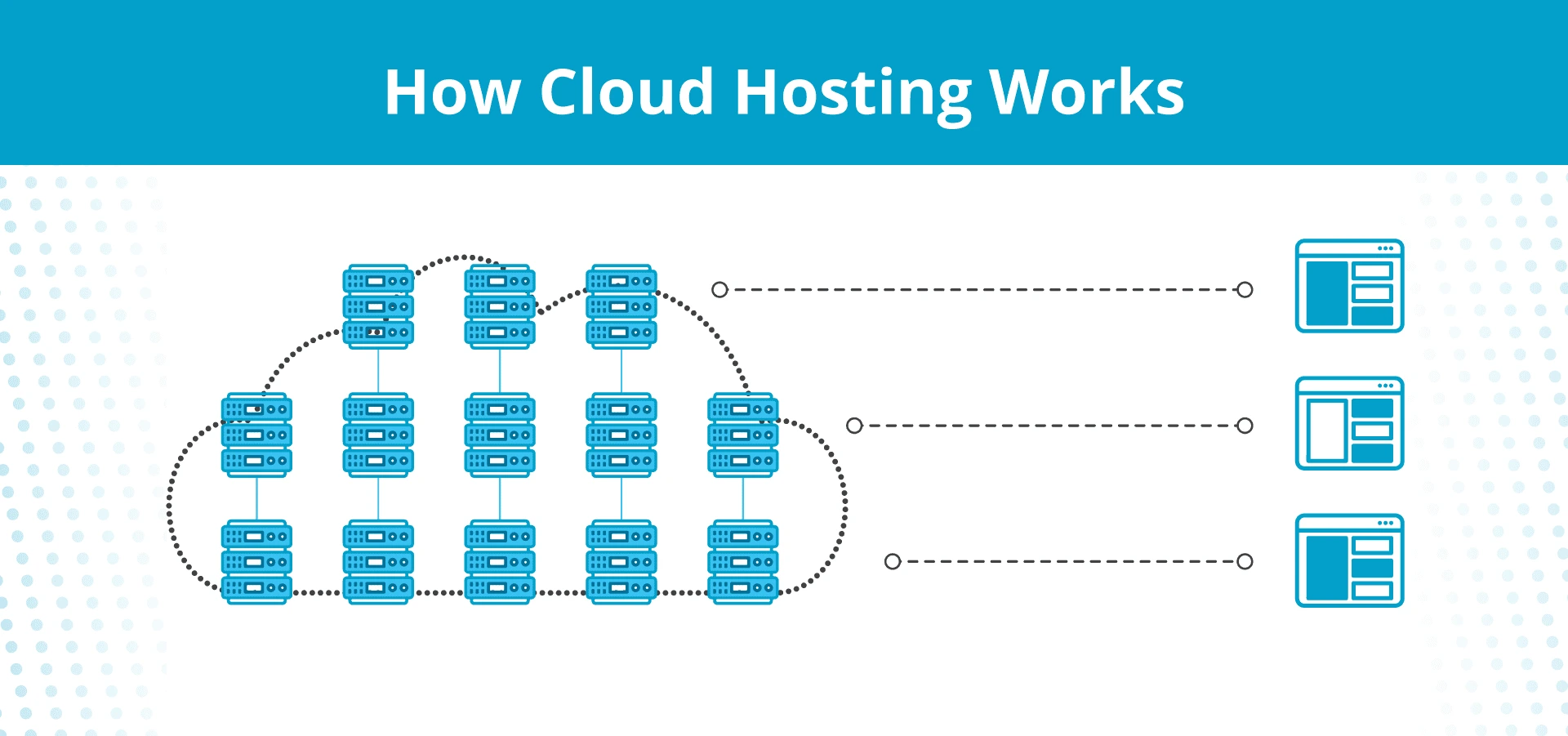
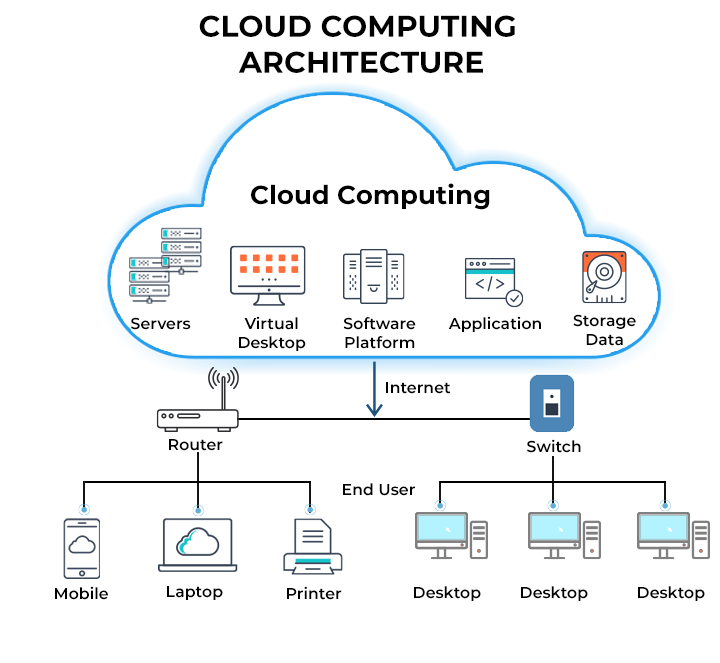
At its essence, cloud hosting is not a physical object but a dynamic and decentralized method of hosting websites and applications. Instead of relying on a single physical server, it operates across a vast, interconnected network of virtual and physical cloud servers, often spread across multiple global data centers. This “cloud” is a metaphor for the internet itself, representing a flexible, on-demand pool of computing resources that can be tapped into as needed. This model represents a shift from ownership to access, offering unparalleled scalability, resilience, and efficiency.
B. Deconstructing the Cloud: How It Actually Works
To truly appreciate cloud hosting, one must understand the technological principles that underpin it. The magic lies in its architecture, which is a significant departure from the single-server approach.
A. The Underlying Architecture: Virtualization and Clustering
The cornerstone of cloud technology is virtualization. This process uses specialized software called a “hypervisor” to create an abstraction layer over physical hardware. The hypervisor divides one powerful physical server into multiple isolated virtual machines (VMs), often referred to as virtual private servers (VPS) or cloud servers. Each VM operates as a fully independent unit with its own dedicated resources (CPU, RAM, storage), and operating system, completely unaware of the other VMs on the same physical machine.
These virtual servers are then pooled together into a vast, unified network known as a cluster. This cluster is the true engine of the cloud. It draws resources from hundreds or thousands of underlying physical servers housed in secure, redundant data centers. When your website is hosted on a cloud platform, it is not residing on one single server; it is running on this entire cluster.
B. The Role of Load Balancers and Redundancy
When a user attempts to visit your website, their request is intelligently managed by a load balancer. This is a critical traffic cop for the cloud. The load balancer distributes incoming requests across multiple servers within the cluster. If one server is experiencing high traffic or a technical fault, the load balancer automatically redirects new requests to other healthy, available servers in the network. This ensures that no single server becomes a bottleneck, optimizing performance and guaranteeing uptime.
C. The On-Demand Resource Model
Perhaps the most defining feature of cloud hosting is its resource model. In traditional hosting, you are typically locked into a fixed plan (e.g., 4 CPU cores, 8GB RAM). If you need more, you must manually upgrade, often requiring downtime. In the cloud, resources are offered as an on-demand utility, much like electricity. You have access to a massive pool of computing power, and you can scale your consumption—both up and down—instantly through a simple control panel or even automatically based on predefined rules. You only pay for the precise amount of resources you consume, leading to a highly efficient and cost-effective model.

C. A Comparative Analysis: Cloud Hosting vs. Traditional Hosting Models
To highlight the advantages of cloud hosting, it’s essential to contrast it with the conventional alternatives.
A. Cloud Hosting vs. Shared Hosting
-
Shared Hosting: This is the entry-level, budget option. Your website resides on a single physical server alongside dozens or even hundreds of other websites. All sites share the same pool of server resources (CPU, RAM).
-
Pros of Shared Hosting: Extremely low cost, user-friendly, managed by the provider.
-
Cons of Shared Hosting: The “noisy neighbor” problem—a spike in traffic on one site can cripple the performance of all others on the server. Very limited scalability and customization. Low security, as a vulnerability in one site can potentially affect others.
-
Verdict: Shared hosting is suitable for very small, static websites with low traffic, such as a simple brochure site or a personal blog just starting. It is not viable for growing businesses or resource-intensive applications.
B. Cloud Hosting vs. VPS Hosting
-
VPS Hosting: A Virtual Private Server is a middle-ground option. Using virtualization, a single physical server is partitioned into multiple virtual servers. You get a guaranteed slice of resources, offering more stability than shared hosting.
-
Pros of VPS Hosting: Dedicated resources ensure consistent performance. Greater root access allows for extensive customization and software installation. More cost-effective than a full dedicated server.
-
Cons of VPS Hosting: It is still ultimately limited by the capacity of its underlying physical host. Scaling resources often requires a manual migration to a larger VPS plan, which can involve downtime. You are responsible for managing and securing the server unless you pay for a managed service.
-
Verdict: VPS is a solid choice for developers and businesses with stable, predictable traffic that need a controlled environment. However, it lacks the innate, seamless scalability and high-availability infrastructure of a true cloud cluster.
C. Cloud Hosting vs. Dedicated Hosting
-
Dedicated Hosting: You rent an entire physical server exclusively for your website or application. This offers maximum control, security, and performance.
-
Pros of Dedicated Hosting: Raw, uncompromised power and performance. Complete administrative control over the server environment. Enhanced security and isolation.
-
Cons of Dedicated Hosting: Very expensive. Scaling is a slow, manual, and costly process that involves physically installing new hardware. Requires significant technical expertise to manage and maintain.
-
Verdict: Dedicated servers are reserved for large enterprises with exceptionally high, consistent traffic and stringent security or regulatory requirements (e.g., large financial institutions, government agencies). For most other scenarios, cloud hosting provides similar or superior benefits with far greater flexibility.
D. The Multifaceted Advantages of Adopting Cloud Hosting
The architectural superiority of cloud hosting translates into a compelling list of tangible benefits for businesses of all sizes.
A. Unmatched Scalability and Flexibility
This is the cloud’s flagship advantage. Whether you experience a gradual growth in traffic or a sudden, massive spike due to a viral marketing campaign, your cloud infrastructure can handle it seamlessly. You can vertically scale (adding more power to an existing server) or horizontally scale (adding more servers to the cluster) with a few clicks. This elasticity ensures your website remains fast and responsive during peak demand, and you can scale down during quieter periods to save costs.
B. Superior Reliability and Guaranteed Uptime
Because your site is not dependent on a single piece of hardware, the risk of catastrophic failure is drastically reduced. In a properly configured cloud environment, the entire system is built with redundancy. If one physical server fails, the load balancer instantly redirects traffic to other operational servers in the cluster. This results in uptime percentages that often exceed 99.99%, a critical factor for e-commerce sites and online services where every minute of downtime means lost revenue and damaged reputation.
C. A Cost-Efficient, Pay-As-You-Go Model
Cloud hosting operates on an Operational Expenditure (OpEx) model rather than a Capital Expenditure (CapEx) model. This means you avoid the large upfront costs of purchasing expensive physical hardware. Instead, you pay a recurring subscription fee based on the resources you actually use. This utility-style billing makes advanced hosting infrastructure accessible to small and medium-sized businesses, freeing up capital for other critical areas like marketing and product development.
D. Enhanced Performance and Speed
Leading cloud providers host their server clusters in state-of-the-art data centers with high-speed network backbones. Furthermore, the distributed nature of the cloud allows for the deployment of Content Delivery Networks (CDNs) with ease. A CDN caches your website’s static content (images, CSS, JavaScript) on servers around the world, ensuring that a user in London accesses the site from a local server, while a user in Tokyo accesses it from another, resulting in blazing-fast load times globally.
E. Robust Security and Data Protection
Reputable cloud hosting providers invest heavily in security measures that would be prohibitively expensive for an individual company to implement. This includes:
-
Advanced DDoS protection to mitigate malicious traffic floods.
-
Sophisticated firewalls and intrusion detection/prevention systems.
-
Regular, automated backups that are stored in geographically disparate locations.
-
Built-in data encryption for both data at rest and in transit.
-
Compliance certifications for standards like ISO 27001, SOC 2, and GDPR.
E. Potential Challenges and Considerations
While the benefits are substantial, a pragmatic approach requires an understanding of its potential drawbacks.
A. The Complexity of Management and Expertise
The immense flexibility of the cloud comes with a steeper learning curve. Managing a cloud infrastructure, especially on a platform like AWS or Google Cloud, requires knowledge of networking, security, and system administration. While managed cloud hosting services are available, unmanaged plans place the responsibility of configuration, maintenance, and security squarely on the user.
B. Navigating Variable and Unpredictable Costs
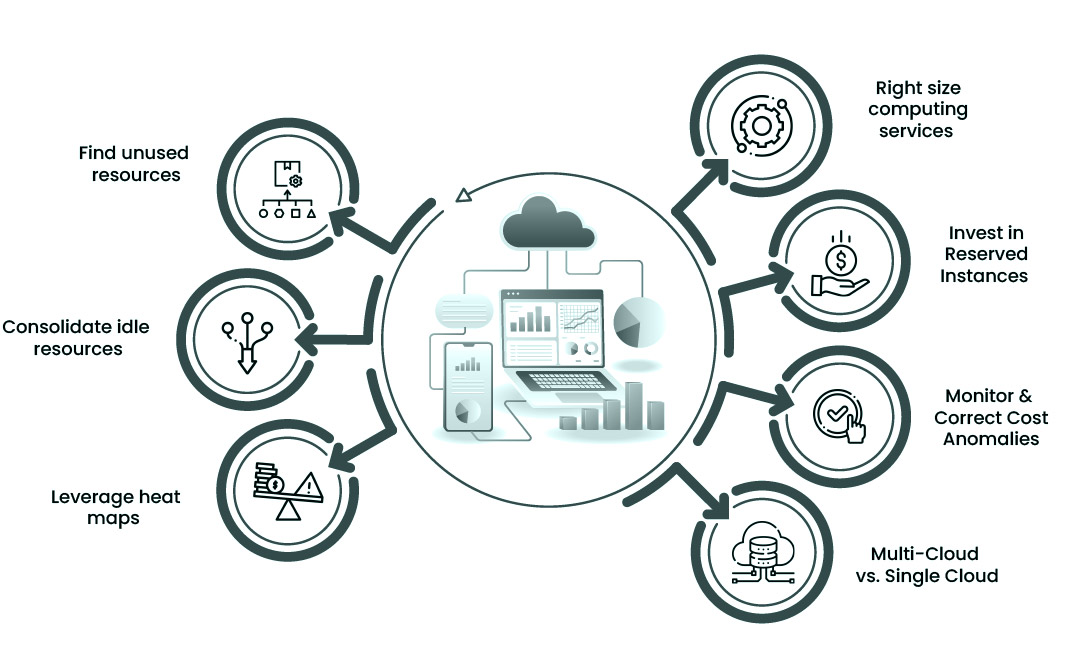
The pay-as-you-go model is a double-edged sword. Without careful monitoring and governance, costs can spiral unexpectedly. A misconfigured resource, a sudden traffic surge, or leaving non-essential servers running 24/7 can lead to “bill shock.” It is crucial to implement budgeting alerts, cost-monitoring tools, and auto-scaling rules to keep expenses under control.
C. Data Privacy and Compliance Concerns
When you use a public cloud, your data is stored on infrastructure owned and managed by a third party. For organizations handling highly sensitive data (e.g., in healthcare or finance), this can raise concerns about data sovereignty and regulatory compliance. It is imperative to choose a provider that offers compliant services and clearly understand the shared responsibility model, which delineates the provider’s security obligations from your own.
F. Prime Use Cases: Who Truly Benefits from Cloud Hosting?
Cloud hosting is not a one-size-fits-all solution, but it is exceptionally well-suited for specific scenarios.
A. E-commerce Websites
Online stores experience fluctuating traffic—calm most of the time, with massive spikes during sales, holidays, or after a successful marketing campaign. Cloud hosting ensures the site remains online and fast during these critical revenue-generating periods, preventing cart abandonment and lost sales.
B. SaaS (Software-as-a-Service) Applications
Applications like project management tools, CRM systems, and email marketing platforms are inherently cloud-native. They require a robust, scalable, and multi-tenant architecture that only the cloud can provide cost-effectively, allowing them to serve thousands of users simultaneously.
C. High-Traffic Blogs and Media Publications
News sites and popular blogs can be hit with a surge of traffic when a piece of content goes viral. Cloud hosting automatically scales to accommodate this influx, ensuring a smooth reading experience for every visitor without crashing the server.
D. Mobile and Web Application Backends
The backend infrastructure for modern mobile and web apps, which need to communicate with users and process data in real-time, is almost exclusively built on cloud platforms for their scalability, reliability, and vast array of supporting services (databases, analytics, machine learning APIs).
E. Development and Testing Environments
Developers can use the cloud to spin up identical, isolated environments for coding, testing, and staging in minutes. These environments can be easily torn down when no longer needed, saving significant costs compared to maintaining physical lab servers.
G. Selecting the Right Cloud Hosting Provider: A Step-by-Step Guide
The market is saturated with providers, from industry giants to niche players. Making the right choice is critical.
A. Assess Your Technical Requirements and Expertise
Be honest about your team’s capabilities. Do you need a fully managed service where the provider handles all technical aspects, or do you have an in-house team ready to manage an unmanaged server?
B. Evaluate the Provider’s Performance and Uptime History
Research independent reviews and look for providers that transparently publish their uptime statistics. Inquire about their data center locations to ensure they have a presence close to your primary audience.
C. Scrutinize the Security Protocols and Compliance Certifications
Ask detailed questions about their security infrastructure: firewalls, DDoS mitigation, data encryption standards, and physical data center security. Ensure they comply with any industry-specific regulations that apply to your business.
D. Analyze the Pricing Structure and Transparency
Look beyond the introductory price. Understand what is included in the base price and what constitutes an add-on cost. Be clear on the costs for bandwidth, storage, and support. Use the provider’s pricing calculator to model your expected usage.
E. Test the Quality of Customer Support
The quality of support can be the difference between a minor hiccup and a major crisis. Test their support channels (live chat, phone, ticket) before signing up. Ask about their average response times and the expertise level of their support staff.
H. Conclusion: The Future is in the Cloud
Cloud hosting represents a fundamental evolution in how we deploy and manage digital resources. It has democratized access to enterprise-level computing power, enabling businesses of all scales to compete on a global stage. While it presents certain challenges in cost management and technical complexity, its benefits—unrivaled scalability, exceptional reliability, and compelling cost-efficiency—are simply too significant to ignore for any serious online venture.
As technology continues to advance, the cloud will only become more integrated, intelligent, and indispensable. Embracing cloud hosting is not merely about choosing a web host; it is about adopting a modern, agile, and future-proof strategy for digital growth. By making an informed decision today, you position your website, application, or business for success in the dynamic landscape of tomorrow.